

A shared login left open, a contractor account never deactivated, an admin credential tied to someone who left six months ago…these are the access gaps that turn into breach incidents. According to the IBM Cost of a Data Breach Report 2024, malicious insider attacks averaged USD 4.99 million (approximately RM23.5 million) per incident, the highest cost of any attack vector studied.
Data access protection is about making sure the right people can reach what they need and keeping everyone else out. Getting the permissions right the first time matters. So does knowing when they have been abused. Here’s how to control data access in organisations, from setting permissions correctly the first time to identifying unauthorised access, using these five core strategies.
Where Access Problems Actually Come From
Here are some common examples of how access exposure builds up:
- Shared passwords: One account, multiple users. No way to trace who did what.
- Dormant accounts: Former staff or contractors still holding active credentials months after leaving.
- Excess permissions: People with more access than their role requires, often left over from a previous position.
- Unreviewed admin rights: Elevated access granted during a system migration and never removed.
Strategy 1: Apply the Principle of Least Privilege
Every user should have access only to what their job actually requires. Access should map to function, not to seniority, not to convenience, and not to whatever was configured during onboarding three years ago.
Start with your highest-risk data and work through who has access, why, and whether that reason still stands:
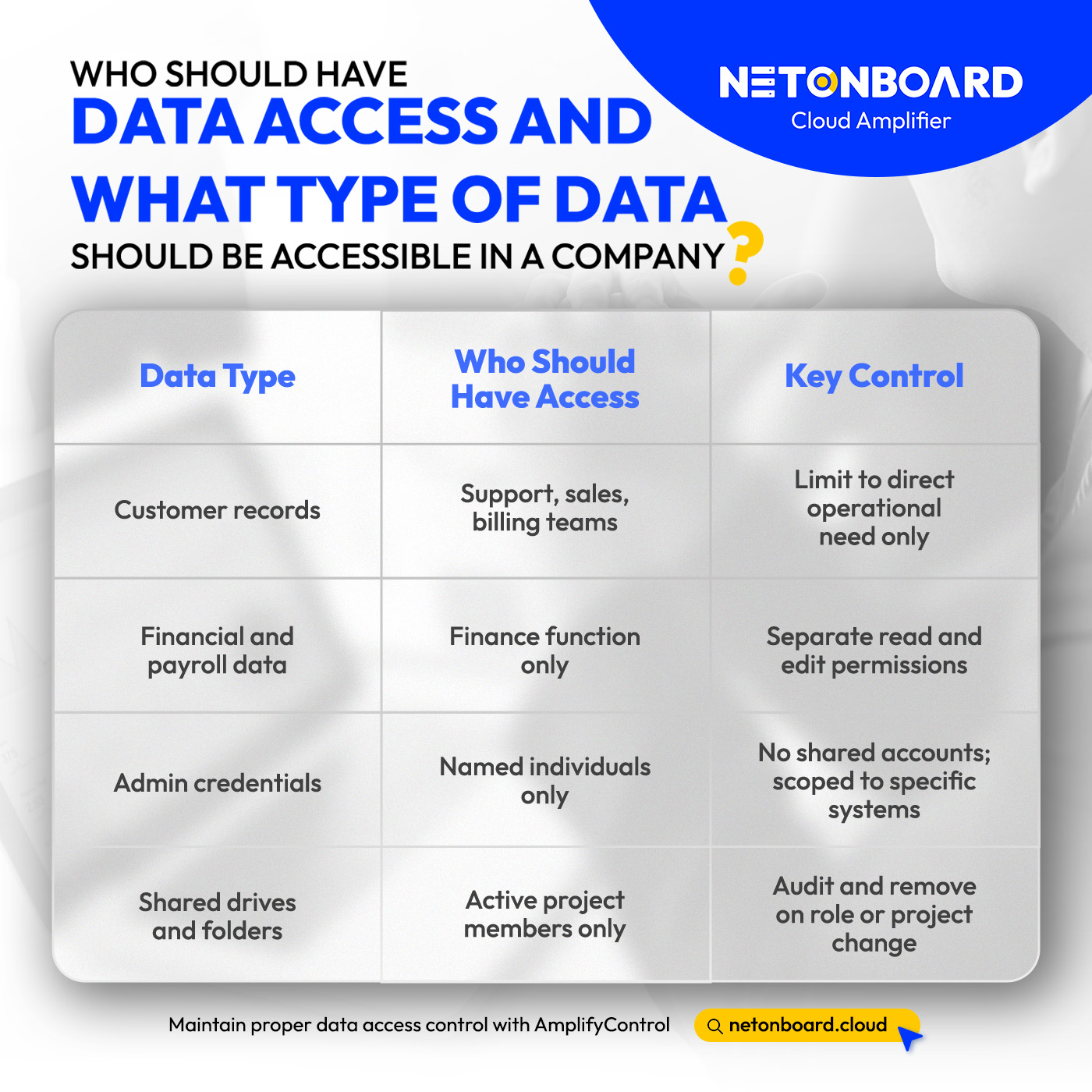
This is the foundation of any credible data access protection posture. Everything else builds on getting baseline permissions right.
Strategy 2: Enforce Multi-Factor Authentication Across All Systems
Passwords get shared, reused, phished, and sold. Multi-factor authentication (MFA) adds a second verification step, usually a code via phone or authentication app, that makes a stolen password far less useful to an attacker.
Prioritise MFA on the systems where a breach causes the most damage:
- Email platforms; Microsoft 365 and Google Workspace are the most common entry point for attackers.
- Cloud storage: OneDrive, SharePoint, Google Drive, Dropbox.
- Remote access tools: VPNs, RDP sessions, remote desktop services.
- Finance systems: ERP platforms, banking portals, payroll software.
- Admin consoles: Any account with elevated privileges.
For businesses on Microsoft 365 or Google Workspace, enabling MFA organisation-wide is a configuration step. It is one of the fastest ways you can prevent unauthorised data access in a company.

Strategy 3: Classify Your Data Before You Protect It
Not all data carries the same risk. Customer payment records need tighter controls than a shared marketing calendar. Data classification means sorting what you hold into tiers and applying access controls that match each one.
A practical four-tier model most businesses can start with:
- Public; information already shared externally: product pages, published reports. No special controls needed.
- Internal; general business information for staff: internal policies, project files, non-sensitive communications.
- Confidential; customer data, contracts, pricing, personnel records. Restricted to relevant teams, access logged.
- Restricted; financial accounts, credentials, sensitive personal data under PDPA including biometric, health, and financial data. Minimal access, full audit trail.
Knowing what you hold and how sensitive it is also matters for PDPA compliance. It is the starting point for demonstrating that your access controls are appropriate for the data you are actually protecting.
Strategy 4: Track What Is Actually Happening With Your Data
Permissions and monitoring need to work together. These are some behaviours that should trigger an alert:
- Bulk downloads: A user pulling large volumes of customer or financial records in a short window.
- Off-hours access: Logins to sensitive systems outside normal working patterns.
- Geographic anomalies: Access originating from a location where no staff are based.
- Repeated failed logins: A sign of credential stuffing or brute-force attempts on an account.
- Privilege escalation attempts: A user trying to reach systems beyond their assigned permissions.
For businesses without a dedicated security team, this is where managed identity security services add real value. Net Onboard’s AmplifyControl Data Access Protection includes continuous monitoring user access patterns, alerting you of any potential risks.
Strategy 5: Build Access Review Into Your Operations
Even well-designed access controls drift over time. Roles change, people move teams, projects end. Without a review cycle, the gap between intended access and actual access widens quietly and steadily.
A practical access review schedule:
- When someone leaves. Immediate revocation across all systems, not just their primary account.
- When someone changes roles. Permissions review alongside the job title update, not weeks later.
- Quarterly. Cross-check who has access to high-risk systems against current active roles.
- Post-project. Close shared folders, revoke temporary access, remove guest and contractor accounts.
Aligning this with HR is the most reliable way to prevent drift. Identity and Access Management (IAM) systems can automate deprovisioning, enforce role-based access policies, and generate the reports required for full PDPA compliance.
What PDPA 2024 Means for Access Control Compliance
From June 2025, Malaysia’s Personal Data Protection (Amendment) Act 2024 requires businesses to notify the PDPA Commissioner within 72 hours of discovering a breach that meets the threshold for significant harm. Penalties for non-compliance have also increased to up to RM1 million per offence.
The first step is knowing when a breach has occurred.
Access control is the operational foundation that makes compliance possible. Businesses with strong access policies, regular reviews, and active monitoring have the logs, the audit trail, and the response capability to act within the required window when an incident occurs.
For businesses in financial services, healthcare, or any sector handling large volumes of personal data, AmplifyControl provides the managed security layer that makes these requirements workable without a full in-house security team.
Start With What You Can See
Getting access control right is not about the most expensive tool. It is about having a clear picture of who has access to what, a process for keeping that picture accurate, and the monitoring to catch when something goes wrong. Most Malaysian businesses are further behind on this than they think.
Speak to the Net Onboard team if you are:
- Unsure who in your organisation has access to sensitive customer or financial data
- Relying on shared logins or informal permission management across cloud systems
- Working towards PDPA compliance and need to demonstrate appropriate access controls
- Running a growing team where access rights are not reviewed when roles change
Net Onboard’s AmplifyControl Data Access Protection covers identity security, access policy management, and continuous monitoring, managed for businesses that need the outcome without building it themselves. Time to find out where your gaps are. Talk to our team today!