

Your internet router has a firewall. It was built for a home connection. It has no application control, no intrusion prevention, no compliance logging, and no idea that your business network is carrying customer data, financial records, and cloud-connected systems. 40% of SMEs rely on this solely, as their default.
However, ransomware on Malaysian SMEs rose 42% year-on-year in 2025. That is the direct cost of a firewall decision that keeps getting deferred.
This guide covers three things: the three business firewall categories available to Malaysian SMEs in 2026, a clear breakdown of what each costs and demands from your team, and a practical framework for choosing the right one without overspending. By the end, you will know which model fits your business and what to ask a vendor before you commit.
Why Malaysian SMEs Can No Longer Ignore the Firewall Decision
Two things changed the groundwork for Malaysian SMEs in the past two years.
First, the threat targeting shifted. Large enterprises hardened their defences, so attackers moved downstream to suppliers, service providers, and SMEs with weaker controls. Credential theft is the leading attack vector in Malaysia, with ransomware incidents more than doubling from 2023 to 2025 and supply chain risk flagged as persistent and growing.
Second, compliance obligations got teeth. The PDPA Amendment Act 2024, fully in force since June 2025, requires breach notification within 72 hours of discovery. Bank Negara Malaysia’s RMiT guidelines apply strict security standards to financial institutions. Any SME that is a vendor or supplier to a regulated enterprise now faces security questionnaires as a procurement condition. A documented, properly configured firewall is part of what those questionnaires check.
The right business firewall solution matches your infrastructure, team capacity, and compliance obligations.
The 3 Firewall Categories: What Each One Actually Does
There are three distinct firewall models in the market. Each solves a different problem for a different type of business.
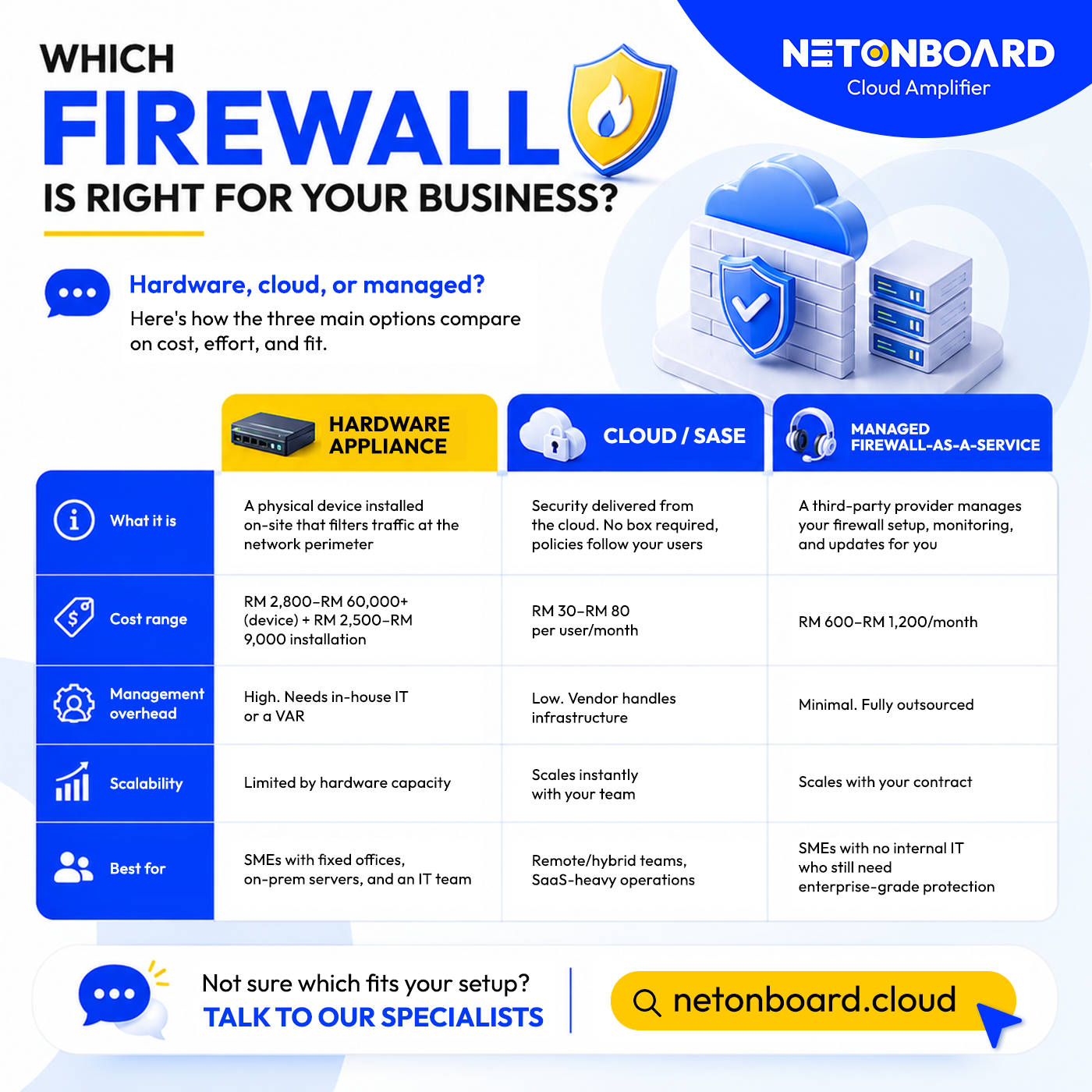
Option 1: Next-Generation Hardware Firewall (NGFW)
Definition: A physical device installed at your network perimeter. Inspects traffic at the application layer, not just port and protocol. Can block specific apps, enforce user-based access policies, and detect intrusion attempts in real time. Leading vendors: Fortinet FortiGate, Palo Alto PA-Series, Sophos XGS, SonicWall TZ.
Cost range: RM 3,300 to RM 70,500+ for the device, plus RM 2,500 to RM 9,000 for professional installation (indicative, based on available market data).
Pros:
- High throughput (1 Gbps to 100 Gbps depending on model)
- Consistent performance under load
- Full control over on-premises network traffic
- Detailed traffic logs for compliance documentation
Cons:
- High upfront cost
- Requires IT staff or a managed provider to configure and maintain properly
- Does not protect remote workers without a separate VPN solution
- Firmware updates and policy reviews are the buyer’s responsibility
Best for: Malaysian SMEs with a centralised office, a stable network perimeter, and an IT team or contractor available to manage the device ongoing.
Option 2: Cloud Firewall / SASE Platform
Definition: Routes all traffic through cloud-hosted security infrastructure instead of a local appliance. Users connect through the security layer regardless of location. Also called Firewall-as-a-Service (FWaaS) or Secure Access Service Edge (SASE) when bundled with broader network security. Leading platforms: Zscaler, Cloudflare Gateway, Palo Alto Prisma Access, Cisco Umbrella.
Cost range: RM 30 to RM 80 per user per month for entry-level plans; RM 1.65 to RM 8.25 per GB processed for traffic-based models.
Pros:
- Protects all users regardless of location, including remote and mobile workers
- No hardware to procure, refresh, or maintain
- Scales immediately as headcount changes
- Native integration with SaaS environments (Microsoft 365, Salesforce, cloud ERP)
Cons:
- Ongoing subscription cost scales with user count
- Policy configuration still requires expertise; a poorly configured cloud firewall creates false confidence
- Performance depends on internet connectivity quality
Best for: Businesses with distributed or remote workforces and cloud-first application environments. Less suitable for businesses with heavy on-premises workloads.
Option 3: Managed Firewall-as-a-Service
Definition: Either a hardware appliance or cloud firewall that is configured, monitored, and maintained by a security provider on your behalf. You own the policy outcomes. The provider owns the operational delivery.
Cost range: RM 705 to RM 1,410 per month for small business environments; mid-market engagements vary by scope and monitoring intensity.
Pros:
- 24/7 monitoring, policy reviews, and firmware updates handled by the provider
- Incident response capability included without building an internal team
- Predictable monthly cost
- Provider manages compliance documentation for PDPA and RMiT purposes
Cons:
- Less direct control over policy decisions
- Quality is only as good as the provider; scope must be defined precisely at contract stage
- Higher ongoing cost than self-managed hardware if you already have strong IT capability
Best for: Malaysian SMEs with 20 to 200 employees who need enterprise-grade protection but do not have internal security staff to deliver it. A hardware firewall that has not been updated in 18 months can be a liability.
Side-by-Side: Cost, Features and Management Overhead
| Factor | Hardware NGFW | Cloud / SASE Firewall | Managed Firewall Service |
| Upfront cost | High (RM 3,300-70,500+) | Low (subscription-based) | Low to medium |
| Monthly cost model | Licence renewals + maintenance | Per-user or per-GB monthly | Fixed monthly retainer |
| Management overhead | High (requires IT staff) | Medium (cloud portal management) | Low (provider-managed) |
| Remote workforce coverage | Limited without VPN | Native (cloud-delivered) | Depends on deployment model |
| Scalability | Limited by hardware capacity | Scales with subscription | Scales with contract scope |
| PDPA / RMiT compliance support | Logging + reporting capable | Cloud-side logging and reporting | Provider manages compliance documentation |
Table: Side-by-Side: Cost, Features and Management Overhead

Which Model Fits Your Business?
Scenario A: Centralised Manufacturing Business, Shah Alam (60 staff, on-premises systems)
Situation: Single site. Core systems (ERP, inventory, production scheduling) on local servers. One part-time IT contractor managing day-to-day issues.
Right call: Mid-range hardware NGFW. A Fortinet FortiGate or Sophos XGS appliance with IPS, application control, and SSL inspection enabled covers the perimeter.
Indicative budget: RM 8,000 to RM 20,000 for hardware and installation; RM 3,000 to RM 6,000 annual support licensing.
Watch out for: If the contractor does not have firewall configuration expertise, pair the hardware with a managed service provider for policy management. A misconfigured NGFW is worse than a well-configured basic one.
Scenario B: Remote-First Professional Services Firm, Kuala Lumpur (35 staff, cloud-based apps)
Situation: Staff working from home, client sites, and co-working spaces. Applications are Microsoft 365, cloud accounting, and a web-based CRM. No dedicated IT team.
Right call: Managed cloud firewall or SASE platform. Hardware at the office perimeter will not protect remote users. A cloud-delivered security layer covers all users regardless of location.
Indicative budget: RM 1,500 to RM 4,000 per month depending on provider and monitoring scope.
Watch out for: Confirm the provider includes policy configuration and ongoing monitoring in the fee, not just the platform licence.
The 7 Non-Negotiable Features for 2026
Any business firewall solution in Malaysia that you evaluate should include all seven of these. A vendor that cannot demonstrate any one of them is not adequate for the current threat environment.
- Zero Trust network access (ZTNA): Verifies user identity and device health before granting network access. Non-negotiable for any business with remote workers or cloud applications.
- Intrusion Prevention System (IPS): Detects and blocks known attack patterns in real time. Without IPS, your firewall filters traffic but does not analyse it for threats.
- Application control: Identifies and controls traffic by application, not just port or protocol. Blocks unauthorised apps and restricts bandwidth for non-business use.
- SD-WAN integration: Intelligent traffic routing across connections for businesses with multiple sites or branch offices.
- Live threat intelligence feeds: Continuously updated data on known malicious IPs, domains, and attack signatures. A firewall running on static rules is a firewall running blind.
- Compliance reporting: Automated log generation and reporting for PDPA incident investigations, RMiT audits, and ISO 27001 assessments.
- Remote and branch coverage: The same policy and protection applied to remote users, branch offices, and mobile devices, not just the main office perimeter.
Before You Sign: 8 Things to Ask a Potential Vendor
Use these eight questions before committing to any business firewall vendor or managed service provider. The answers tell you more than the price.
- Does the provider have experience deploying this solution for businesses of your size and sector in Malaysia?
- Can they demonstrate all 7 features above on the proposed solution?
- What does onboarding look like, and how long before the solution is fully operational?
- Who owns firmware updates and policy reviews, and how often do they happen?
- Who gets notified when a threat is detected, and what is the response time SLA?
- Does the solution produce compliance-ready logs for PDPA and RMiT?
- What does the contract say about incident response and escalation?
- What is the total cost of ownership over 3 years, including hardware, licences, services, and management?
If you’re ready to move from a router firewall to a properly deployed next-generation firewall, Net Onboard offers a range of network security hardware solutions for SMEs and mid-market businesses that cover deployment, configuration, and ongoing management across hardware, cloud, and managed options. Speak to the Net Onboard team to gauge your security posture today.