

Most Malaysian SME owners can name the admin work that eats their week without pausing to think, such as invoices to key in, quotes to type up, and the same customer questions to answer. None of it grows the business, but they are still necessary.
AI has reached the point where it can move a fair slice of that load off your team’s desk. The real question is where AI automation for business should begin, and the honest answer depends on the task in front of you.
Below, here’s how to spot a task worth automating, ten common ones ranked by the hours they tend to swallow, what should stay with a person, and a 30-day pilot you can run on the first two.
How Do You Know A Task Is Worth Automating?
Not every repetitive job is a good candidate. Four things tell you a task is ready to hand over.
- Frequency: it happens daily or weekly, not once a quarter.
- Fixed rules: the steps are the same each time, or close to it.
- Volume: enough of it stacks up that shaving minutes turns into hours.
- Cost of an error: a mistake is a nuisance, not a disaster you cannot undo.
A task that scores on all four is worth automating. However, one that fails on cost of error or that touches personal data should still stay on a person’s desk.
AI For Business Is Not One Tool
AI for business these days splits into three tiers, and the right one depends on how much judgement the task needs.
- Rules-based automation follows a fixed if-this-then-that flow. It never deviates, which suits tasks that never change.
- AI automation reads unstructured input, like an email or a scanned invoice, and turns it into something your systems can use.
- AI agents go a step further and work out the next action as it goes.
Match the tier to the task and you can easily put a cost-effective build together for AI automation for business.
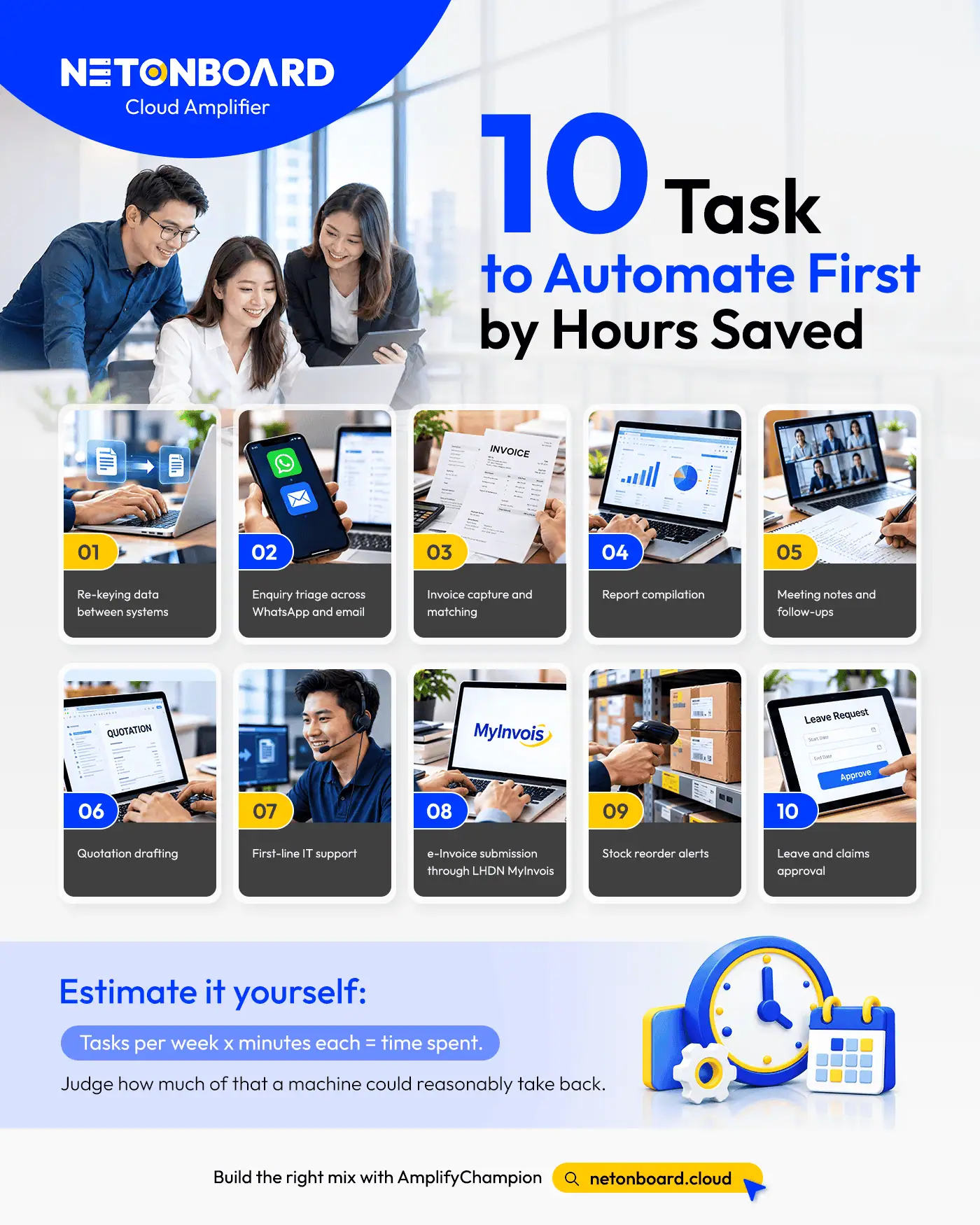
The Ten Tasks To Hand Over First
Many Malaysian SMEs still do several common tasks by hand. Here is each one tagged with the tier it needs.
Treat the order as a starting point, then re-rank it against your own volumes.
- Re-keying data between systems (rules-based). The same figures typed from one app into another because the two do not talk. No judgement, high frequency, the clearest win here.
- Enquiry triage across WhatsApp and email (AI agent). Sorting messages, routing each one, drafting a first reply. Unpredictable volume, which is why a fixed rule cannot cope.
- Invoice capture and matching (AI automation). Reading a supplier invoice and matching it to its purchase order. Layouts differ by supplier, so the tool has to read each one.
- Report compilation (AI automation). Pulling numbers from a few sources into the weekly or monthly report.
- Meeting notes and follow-ups (AI automation). Turning a call into a clean summary and a list of who owes what.
- Quotation drafting (AI automation). Building a priced quote from your catalogue, ready for a person to check and send.
- First-line IT support (AI agent). Password resets, access requests, and the same three questions on repeat.
- e-Invoice submission through LHDN MyInvois (rules-based). Formatting and submitting invoices to the tax portal. The exemption threshold rose to RM3 million turnover in 2026, so many smaller firms are not in scope yet; above it, the submission is a fixed, repeatable job.
- Stock reorder alerts (rules-based). Flagging a line the moment it drops below its reorder point.
- Leave and claims approval (rules-based). Routing each request to the right approver against a set policy.

How to Turn the List Into an Hours Number
Put a number on it before you build. The sum is simple: how often a task runs, times the minutes each run takes, gives what it costs today.
Take invoice capture, for example. Someone keying forty invoices a week at four minutes each spends about 160 minutes, close to three hours, every week. Automate the capture and matching, leave the odd exception for a person, and getting back two of those three hours is a fair expectation. Run the same sum on your own figures and the order sorts itself out.
What Should Stay With A Person
Automation is valuable for tasks on a routine, but don’t entrust it with making the calls that need judgement or carry risk. Three things should stay human:
- Approvals: a person signs off spend, contracts, and anything with a legal edge.
- Exceptions: when a task falls outside the rule, it goes to someone who can think, not a model guessing.
- Anything PDPA-sensitive: work that reads, moves, or stores personal data needs a human in the loop and a clear record of who did what.
The Personal Data Protection (Amendment) Act has been in force since June 2025, with a 72-hour breach notification clock and stricter rules on how personal data moves.
Software doing the first pass does not lift those duties. Any data that automation touches still counts as something your business is answerable for.
A 30-Day Pilot For Your First Two Tasks
Pick your two heaviest tasks from the list and run a month-long pilot, small enough to measure and honest enough to trust.
- Week one: log how long the two tasks take by hand today, so you have a baseline.
- Week two: build the automation for the simpler of the two and run it alongside the manual version.
- Week three: switch the first task over, send every exception to a named person, and note what breaks.
- Week four: add the second task, then compare the real hours saved against your week-one baseline.
At the end you have a number measured, and that is the figure worth taking to the rest of the business.
See the Benefit of AI Automation with Net Onboard
Spotting the task is the easy part. The work sits in building the automation on data it can trust, wiring it to the systems you already run, and keeping a person on the approvals that matter.
That sequence is what our AmplifyChampion pillar was built for. At Net Onboard, we start with the foundation, digitisation and simplification, before automation goes anywhere near a live process, so the tools land on something clean. Our team scopes which tasks are worth handing over, builds the right tier for each, and manages the platform behind them, giving you business automation and AI solutions Malaysia‘s SMEs can run day to day.
Ready to hand the admin over? Start your automation roadmap with our business automation and AI solutions in Malaysia and we will scope the first two tasks, the tier each one needs, and the hours you stand to get back.